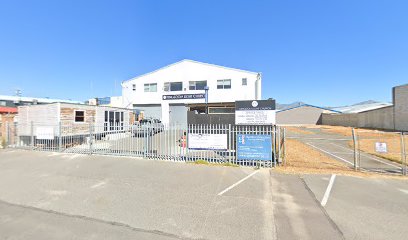
Synats Computers is a Computer training schools establishment in Cape Town, Western Cape, South Africa
Cape Town
Western Cape
7140
South Africa
Curriculum
Synats Computers in Cape Town offers a focused portfolio of computer literacy programmes designed to meet the needs of jobseekers and professionals seeking practical, employment-ready skills. The curriculum emphasises foundational competencies alongside more advanced, recognised certifications, with pathways that accommodate both beginners and those seeking to enhance specific office productivity capabilities.
Core offerings span essential computer literacy through to advanced office applications. At the entry level, learners can engage with Computer Basics (Step-By-Step), which provides a structured introduction to using a computer for home or work contexts. Building on this foundation, certification-focused modules cover key Microsoft Office tools, including MS Word Core and MS Word Expert, MS Excel Core and MS Excel Expert, MS PowerPoint Core, and MS Outlook Core. Each module stages tasks and practical outcomes that mirror real-world office scenarios, enabling learners to demonstrate both proficiency and productivity gains in document creation, data organisation, presentation design, and email/communication management.
The curriculum adopts a blend of traditional classroom instruction and modern delivery methods. A distinctive feature is the emphasis on one-on-one and small-group training, described as a flagship approach that supports personalised learning trajectories. This format is complemented by E-Learning options—Single App Licences and Full Suite Licences—built on reputable courseware that supports learners who cannot attend in person or who prefer flexible, self-paced study. The e-learning offerings reflect a commitment to accessible learning, allowing participants to study at their own pace while maintaining alignment with practical outcomes and assessments.
Assessment and certification within the curriculum are anchored by internationally recognised standards. The centre highlights IC3 (Internet and Computing Core Certification), which emphasises fundamental digital literacy aligned with contemporary computing environments. In addition, several Microsoft Office certifications are featured, with an emphasis on performance-based assessment to gauge real-world capabilities. The combination of IC3 and Microsoft Office certifications provides a credible pathway for individuals aiming to validate essential digital skills for employment or promotion.
Curriculum design integrates contemporary learning resources and partnerships that enrich the instructional experience. Jasperactive-based e-learning offerings place emphasis on kinaesthetic learning for Microsoft Office applications, supporting learners through practice-based activities tied to the Microsoft Office Specialist Global Standard. Such resources are positioned as a distinctive element of the programme, enhancing engagement and reinforcing practical application of skills in a work context.
Beyond formal qualifications, the curriculum encompasses broader employability-enhancing support. The training centre operates as a Certiport Authorized Exam Centre, underscoring a sustained focus on recognised assessment and validated outcomes. This status helps ensure that learners can access official examinations and secure certification alongside the course material. The combination of certification readiness, flexible learning modes, and a learner-centric delivery model contributes to a curriculum designed to improve workforce readiness and employability.
In summary, the Curriculum at Synats Computers combines a clear progression from basic computer literacy to advanced office technology mastery, underpinned by blended delivery options, flexible e-learning, and industry-aligned assessments. By prioritising practical skills, one-on-one and group learning, and reputable courseware, the programme aims to equip learners with certified competencies that are demonstrable in professional settings. Details such as course durations, fees, entry requirements, and specific module outlines are provided directly through the centre or its online materials, with a focus on transparency and relevance to the South African context. For further information on courses and registration, the official website offers accessible routes to explore the curriculum in more depth.
- Core courses: Computer Basics (Step-By-Step); IC3; MS Word Core/Expert; MS Excel Core/Expert; MS PowerPoint Core; MS Outlook Core.
- Online and blended learning: E-Learning (Single App Licence); E-Learning (Full Suite Licence).
- Delivery approach: One-On-One and group training; emphasis on practical, workplace-ready outcomes.
- Distinctive resources: Jasperactive kinaesthetic learning via E-Learning; Certiport authorised examination Centre status.
To explore the full curriculum and access course details, see the centre’s courses section on the official site: Synats Computers Courses.
Faculties and Branches
Synats Computers Training Centre operates from Cape Town in the Western Cape, offering a focused portfolio of computer literacy programmes and certification courses. The organisation is presented as a dedicated training hub rather than a multi-campus federation, with a structure that centres on practical skill development and recognised qualifications for workplace readiness.
Within its core offering, the centre functions as a single, integrated training environment, delivering a range of short courses and certification tracks. The emphasis is on both foundational and advanced computer competencies, designed to equip learners for employment or progression within a professional setting. The programmes are delivered through a combination of one‑on‑one tuition and small-group sessions, reflecting an approach that prioritises personalised attention alongside collaborative learning.
The curriculum at Synats Computers covers essentialoffice and general computing skills, with a progression pathway across several subject areas. The following faculties or subject domains are evident in the course portfolio:
- Computer Basics (Step‑By‑Step): Aimed at establishing foundational competencies in using a computer, suitable for home and office environments.
- IC3 (Internet and Computing Core Certification): A certification track that emphasises practical understanding of computing and online navigation in contemporary work contexts.
- Microsoft Office Core certificates: Core modules in MS Word, MS Excel, MS PowerPoint, and MS Outlook, focusing on practical application and task-based skills required in most professional settings.
- MS Word Expert and MS Excel Expert: Advanced tracks designed to extend productivity and efficiency through specialised document and spreadsheet capabilities.
In addition to traditional classroom formats, the centre delivers E‑Learning options designed for learners who prefer flexible study. The E‑Learning offerings include a Single App licence and a Full Suite licence, drawing on Jasperactive and related courseware to support self-paced, kinaesthetic learning aligned with recognised standards. Such arrangements enable access to course materials remotely and at convenient times, complementing in-person instruction.
Relating to services and learner support, Synats Computers emphasises employability and workforce readiness. The stated beliefs and values highlight integrity, honour, and capacity building, with an emphasis on equipping learners with the tools needed to succeed in both the job market and broader society. The institution also positions itself as a Certiport Authorized Exam Centre, underscoring its role in assessing and validating competence through a recognised certification framework. This status reinforces the connection between programme offerings and external accreditation, providing learners with credible credentials upon completion of specified tracks.
Access to information about courses and enrolment is facilitated through the main website, which hosts detailed descriptions of individual courses, learning outcomes, and certification pathways. While explicit details about multiple physical campuses or regional branches are not provided, the Cape Town location is presented as the central hub for administration, instruction, and assessment activities. Prospective students and interested organisations can explore the course portfolio and related services online to understand how the faculties align with programmes, learner support, and examination options.
For more information about course availability, delivery modes, and the examination centre status, prospective learners can visit the centre’s official website and follow the linked course pages for up‑to‑date details. The site also offers access to E‑Learning packages and related resources that support flexible study arrangements in addition to traditional classroom-based learning.
Registration Details
Synats Computers Training Centre operates from Cape Town in the Western Cape, offering a range of computer literacy and certification-focused courses designed to equip learners for employment and workplace success. Registration for courses is supported through the centre’s online presence, with course information accessible on the official website.
Application overview:
The process begins by exploring the available courses, which include Computer Basics (Step-By-Step), IC3 (Internet and Computing Core Certification), and a suite of Microsoft Office certifications (Word, Excel, PowerPoint, and Outlook) at core and expert levels. E-learning options are also available, providing flexible access to course materials and assessments. While specific registration steps are not itemised on the site, interested applicants can navigate to the course pages for detailed descriptions and to identify suitable programmes.
Where to apply:
Applications for courses are routed through the site’s course listings and related pages. Prospective learners can visit the following sections to view offerings and links to individual course details:
- Courses overview: https://www.synatcom.co.za/courses
- Individual course pages (e.g., Computer Basics, IC3, MS Word Core/Expert, MS Excel Core/Expert, MS PowerPoint Core, MS Outlook Core, E-Learning options): these provide course-specific information and direct access to registration where available.
- E-learning options: https://www.synatcom.co.za/course-portfolio/e-learning-single-app-lic/ and https://www.synatcom.co.za/course-portfolio/e-learning-full-suite-lic/
For general contact and further guidance, the Contact Us page offers the primary route to obtain personalised assistance: https://www.synatcom.co.za/contact-us
Eligibility/entry requirements:
The site emphasises accessible computer literacy training and workforce readiness but does not list explicit eligibility criteria for registration. The range of courses appears to accommodate beginners through to those seeking certification, with a focus on developing computer skills and validating competencies through recognised certifications. Prospective applicants should review the specific course descriptions to determine suitability.
Documents typically required:
The site does not specify required documents for registration. Where a programme includes an exam or certification component, information about prerequisites or preparation requirements may be found on the individual course pages or by contacting the centre directly through the provided channels.
Contact and support:
For assistance with registration, queries, or to obtain detailed guidance on available courses, contact the centre via the website’s contact options. Access the main contact area and explore the available communications pathways here: https://www.synatcom.co.za/contact-us
Notes:
Synats Computers’ offerings include one-on-one and group training, practical and theory-based Microsoft Office certifications, and flexible e-learning solutions designed to fit different learning needs and schedules. The courses are positioned to support learners aiming to improve employability and workplace competence. The organisation also highlights its status as a Certiport Authorized Exam Centre, a detail that may influence examination arrangements for certification assessments.
- Browse Courses: https://www.synatcom.co.za/courses
- Course details and registration links: see individual course pages under the Courses section
- E-Learning options: https://www.synatcom.co.za/course-portfolio/e-learning-single-app-lic/ and https://www.synatcom.co.za/course-portfolio/e-learning-full-suite-lic/
- General contact: https://www.synatcom.co.za/contact-us
Sorry, no records were found. Please adjust your search criteria and try again.
Sorry, unable to load the Maps API.
Education and educational resources in Cape Town
Cape Town, located in the Western Cape of South Africa, offers a diverse array of educational opportunities for learners at all stages. The city’s universities, colleges, schools, and specialised training centres are supported by a network of libraries, laboratories, and public facilities that enhance access to learning. The environment tends to emphasise pathways from school through higher education and into vocational training, with a broad spectrum of options for families to explore.
In terms of institutions, Cape Town hosts a mix of public and private schools that provide education from primary through secondary levels. Many schools offer bilingual or multilingual programmes and place emphasis on core subjects, arts, sciences, and physical education. Public examination routes commonly include national and regional assessments, with schools often offering additional support for learners who require extra help or enrichment. Beyond traditional schooling, there are also independent and specialised schools that focus on curricula aligned with international benchmarks or alternative pedagogies.
Higher education in the city is anchored by universities, polytechnic-style further education colleges, and dedicated teacher training centres. Universities such as those in the area typically provide undergraduate and postgraduate degrees across faculties including arts, sciences, engineering, business, and health sciences. They frequently host research centres, public lectures, and community engagement projects that broaden access to knowledge and cultural experiences. Further education and training colleges offer diploma programmes, certificates, and short courses designed to equip learners with practical skills for the workforce. Positions in technical and vocational education often emphasise hands-on learning in modern workshops and industry partnerships.
For those seeking targeted skills, the region houses numerous training centres and private providers offering career-focused programmes. These may cover areas such as information technology, hospitality, construction, mechanical trades, health support roles, and creative industries. Many providers collaborate with local employers to shape curricula around employability and sector needs, thereby simplifying transitions into the job market for graduates and apprentices alike.
Learning support and student services play a central role in Cape Town’s educational landscape. University and college campuses commonly provide libraries with extensive collections, quiet study zones, computer laboratories, and access to online databases. Disability and accessibility services support learners with specific needs, while language support and academic writing centres assist those navigating coursework in different languages. Student unions and welfare offices contribute programmes related to mental health, financial literacy, accommodation information, and safeguarding, helping learners manage the practicalities of study and campus life.
Facilities across institutions typically include laboratories, workshops, performance spaces, sports complexes, and student housing where available. On-campus accommodation tends to be paired with meal services or residential life programmes, offering environments that promote study routines alongside social and cultural activities. Optical and digital resources, such as e-libraries and online learning platforms, extend access beyond campus hours and support flexible study patterns for mature students or those balancing work with study.
Typical pathways begin with a registration or admission process, often requiring official transcripts, proof of prior study, or an application through a central registry. Prospective learners are advised to explore entry requirements, scholarship possibilities, and credit transfer options, particularly when moving between schools, colleges, or higher education institutions. Guidance services, open days, and port-of-call information are commonly available to help families compare programmes, plan progression routes, and understand funding opportunities.
Website links to official information can be useful for planning, with many institutions maintaining current prospectuses, course lists, and enrolment timelines online. While the landscape is diverse, the overarching pattern remains clear: Cape Town provides a broad ecosystem for education and lifelong learning, from foundational schooling to advanced degrees and practical skills training, all supported by rich resources and a commitment to accessible learning.
- University-level study in the Cape Town region: explore programmes, campuses, and admissions timelines at official university sites.
- Further education and training: discover diploma and certificate options that lead to practical careers and industry readiness.
- Learning support services: consider libraries, academic support, language programmes, and disability services when evaluating institutions.